
Shopify apps / Made-to-measure commerce
Welcome to our custom price calculator.
Your products. Your prices. Any size.
Meet Genesis Custom Price Calculator, listed on Shopify as Custom Size Price Calculator. Let customers enter their dimensions, choose a material or finish, and see an instant price based on area.
We hope you enjoy using the app. If you need a hand getting started or have something specific in mind, please get in touch.
Built around your products
A setup that fits what you sell.
For wallpaper, wall art, flooring, rugs, stone and other products sold by area.
Flexible area pricing
Set one price per square metre or different rates for materials and finishes. Configure individual products or share a setup across a collection.
Measurements made clear
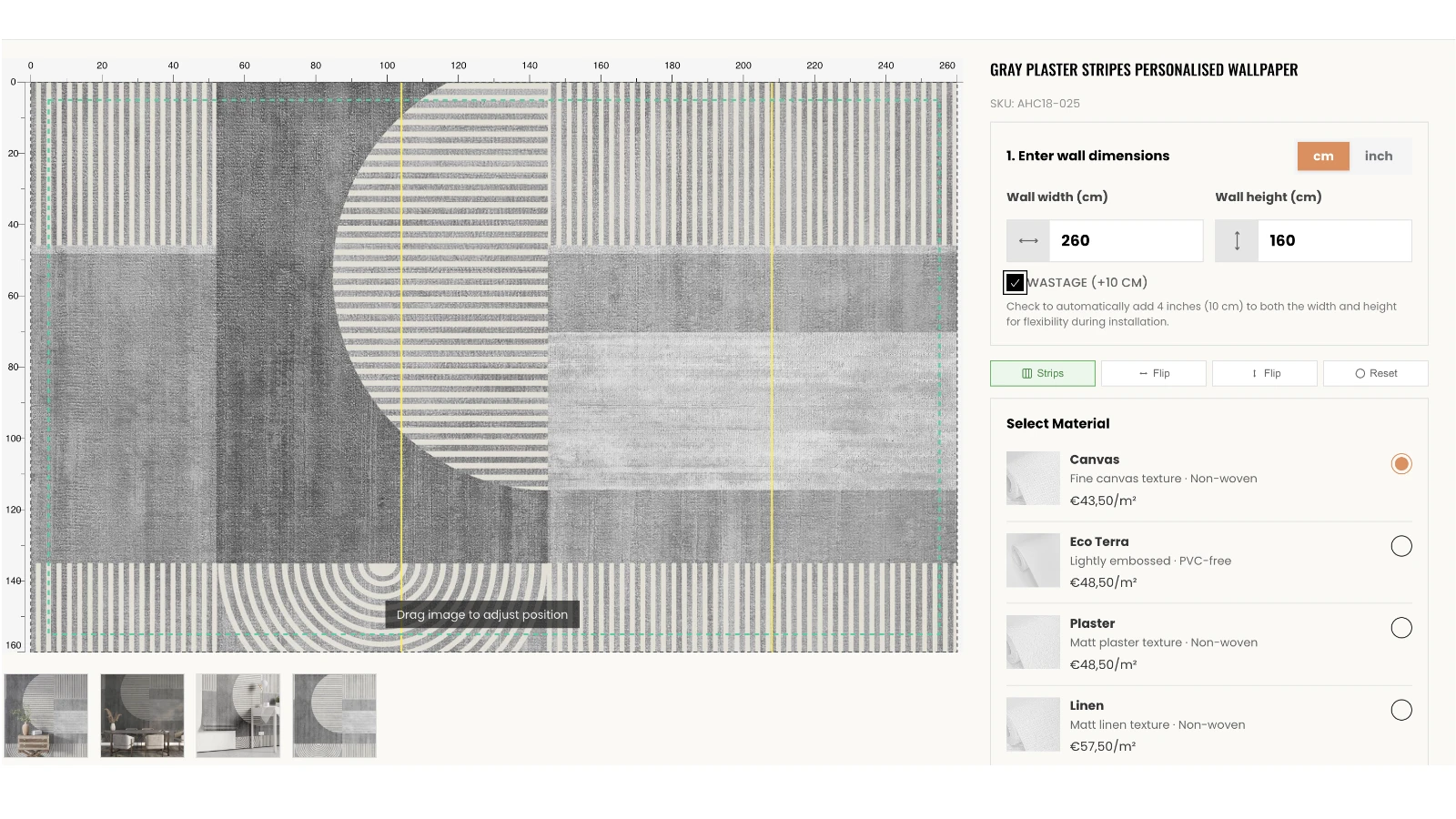
Offer centimetres and inches, your own labels, minimum dimensions and optional cutting allowance settings.
Preview before ordering
Add artwork previews, image positioning and measurement guides where they help customers visualise their order.
Part of your Shopify store
Choose an inline product-page calculator or a dedicated calculator page. Customers continue through your Shopify cart and checkout.
Experience beyond the app
Made-to-measure products.
Support tailored to you.
We work with brands selling made-to-measure products, from custom Shopify themes to integrations that support how they sell. Tell us what you sell and how you want customers to order, and we’ll help you find the right setup.
Most setup help is free. Complex theme changes or custom features may involve a charge, agreed with you first.
Discuss your store with us ↗A little clarity
Your questions, answered.
What does Genesis Custom Price Calculator do?
It lets customers enter a width and height, see a price based on the resulting area, choose an option such as material or finish, and add their configured product to Shopify's cart.
What products can I use it for?
It suits products priced by area, including wallpaper, wall art, flooring, rugs, stone and other made-to-measure surfaces. It calculates area pricing; it does not automatically calculate whole packs, roll quantities, curtain fullness or installation requirements.
How is the price calculated?
The calculator multiplies width by height to find the area, then applies your price per square metre. For example, 200 × 300 cm is 6 m². At £35 per m², the product price is £210 before any applicable Shopify taxes, shipping, discounts or market adjustments.
Can customers enter centimetres or inches?
Yes. Customers can switch between centimetres and inches, with measurements converted for area pricing. You set the minimum width and height for each product or collection. The default 100 cm measurement is not a compulsory minimum.
Can materials have different prices?
Yes. You can create an option selector, for example for material or finish, with a separate price per square metre for each choice. You can also use a single rate or use the source product's first Shopify variant price as the rate per square metre.
Can I configure an entire collection?
Yes. A collection setup can apply to its current and future products. Save an individual product setup when it needs different settings; saved product settings take priority over the collection settings they override.
Can customers preview artwork?
For products configured with artwork, customers can preview the selected dimensions and reposition the image. Optional controls include flipping, rulers and panel guides. Previews help customers visualise their selection; they are not a colour proof or a guarantee of production resolution.
What does the 10 cm cutting allowance do?
When enabled and selected, it adds 10 cm to the entered width and 10 cm to the entered height. The calculator includes the resulting larger area in the price. It does not add 10 cm to every edge.
Where does the calculator appear?
Choose an inline calculator on the product page or a separate calculator page within your store. Placement and styling depend on your theme and setup.
Will it change or delete my original products?
Your original products are kept. The app creates separate custom-priced products for customer orders and removes those temporary products automatically when they expire. Existing Shopify orders retain their order details.
Will it work with my theme?
The app uses Shopify theme app extensions for compatible Online Store 2.0 themes. Custom themes and other apps may need additional setup or compatibility checks.
Can you help me set it up?
Yes. Email [email protected] with your store URL, what you sell and what you want the calculator to do. Most setup help is free. Charges may apply for complex theme changes or custom features, which we will discuss with you first.
How do I manage my subscription?
Use the app's subscription management option to view or manage your Shopify subscription. Check the Shopify plan screen for current pricing, trial terms and the effective date of any cancellation.
Need anything else?
Email us with your store URL and what you’d like to achieve.
[email protected] ↗